Login & Password Changes – October 1, 2026
Dear Valued Customer,
Beginning October 1, 2026, Comox Pacific Express Ltd. is moving website logins to a new backend authentication system. This change strengthens the security of your account and the shipping information stored in it.
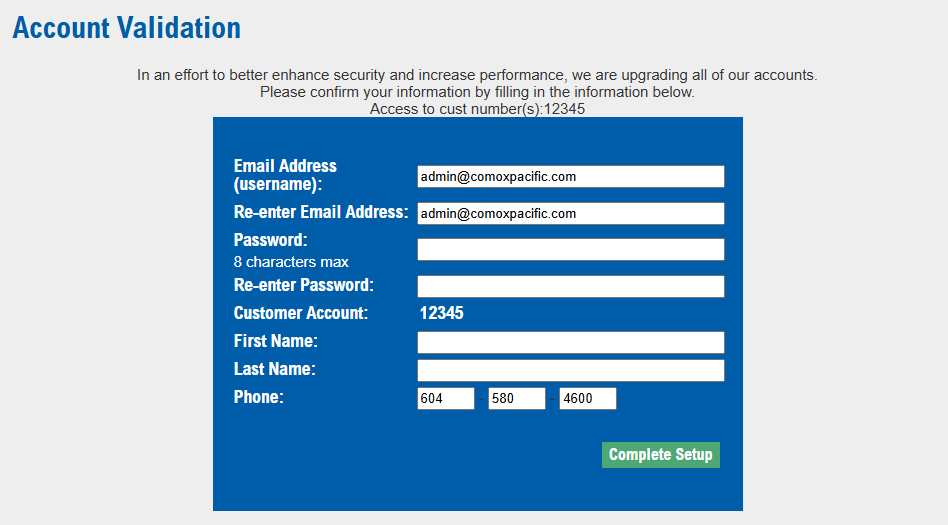
What is changing
1. Your account must be verified once
The new backend cannot carry your existing sign-in credentials forward automatically, so each account has to be verified before it can be used on the new system. The first time you sign in on or after October 1, 2026, you will be walked through a short, one-time verification of your account. It only needs to be completed once.
2. You may change your email address, or keep the one you have
Your email address is also your username. On the verification form it is filled in with the address we have on file, and you can either confirm it or replace it with a different one. If you would rather stay with your current address, simply leave it as it is.
3. You may change your password, or keep the one you have
During verification you can either set a new password or continue using your current one – the choice is yours. There is no requirement to change it. If you would rather update your password ahead of time, you can do so now from the Change Password page.
4. We cannot look up your password for you
The new system stores passwords using a stronger, one-way encryption algorithm. That means your password is never readable – not by our staff, and not by anyone with access to our systems. This is a deliberate security improvement, but it does have one practical consequence: we have no way to retrieve or tell you your password. If you forget it, it cannot be looked up – it can only be reset by you through the Forgot Password page.
What is not changing
- Your login stays the same unless you choose to change it, and if you do, everything below follows you to the new email address.
- All of the accounts linked to your login remain linked.
- Your access and permissions remain exactly as they are today – shipment status, shipment search, online statements, invoices, bills of lading, rate quotes, pickup requests, and every other tool you use now.
- Your saved information and history remain available.
What you need to do
- After logging in, confirm the information and the account numbers are correct. Update any information (email/password/name/phone) if changes needed.
- Sign in using the email/password you confirmed in the update going forward
- If you change your email or password, it will try to log into the new system first but if you attempt to use the old email or password, then you will be prompted to confirm again
Questions
If you have any questions about this change, or need help with your login, please contact your customer service representative, your local service centre, or our administration office:
Phone: 1-800-698-2111
Phone: 1-604-580-4600
You can also reach us through our Contact page.
Thank you for your continued business and for your patience as we complete this upgrade.